
![[AndyB] Content watch manager](/data/resource_icons/7/7406.jpg?1720149273)
- Compatibilidad con XF
- 2.2.x
- Descripción breve
- Disable email notifications for content watch with admin setup and table updates. Setup in admin control panel, add 'contentwatchmanager' to forum URL for xfforumwatch, xfthreadwatch, and xfuseroption tables. Apply specific template mods.
Disables content watch email notifications.
This add-on will disable content watch emails by removing the watch by email options and updating tables so that email notifications are changed to just alerts.
Setup step 1:
In the admin control panel you will want to set the following:
Admin control panel -> Setup -> Options -> User registration -> Default registration values

Setup step 2:
To update tables, you will need to add 'contentwatchmanager' to your forum URL. This will update the following three tables:
xf_forum_watch
xf_thread_watch
xf_user_option
Template modifications:
The following template modifications are applied.
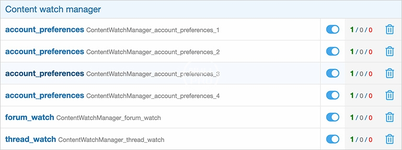
This add-on will disable content watch emails by removing the watch by email options and updating tables so that email notifications are changed to just alerts.
Setup step 1:
In the admin control panel you will want to set the following:
Admin control panel -> Setup -> Options -> User registration -> Default registration values
Setup step 2:
To update tables, you will need to add 'contentwatchmanager' to your forum URL. This will update the following three tables:
xf_forum_watch
xf_thread_watch
xf_user_option
Template modifications:
The following template modifications are applied.
![[ITD] Ocultar Avatar (Lite)](/data/resource_icons/27/27880.jpg?1781425296)


![[AndyB] Ad manager](/data/resource_icons/8/8631.jpg?1720149279)
![[AndyB] Affiliate manager](/data/resource_icons/4/4391.jpg?1720149256)