

- Compatibilidad con XF
- 2.3.x
- Descripción breve
- Drac's Modal keeps members engaged by seamlessly opening Terms and Privacy pages in elegant popups directly from your XenForo site. No new tabs or lost form data—always up-to-date with live page content. Zero configuration for seamless integration, auto-theming matches any style variation, and includes admin shortcuts for easy management.
When someone is filling out the registration form and taps Terms and rules or Privacy policy, the last thing you want is to throw them onto a whole new page and lose their progress. Drac's Modal intercepts those links anywhere on your site and opens the page's content in a clean, animated popup — read, close, carry on. No new tabs, no lost form data.
It works out of the box with zero configuration.
The modal reads the colors, fonts and button styling from your currently active style — and even the active style variation (light/dark) — so it blends right in on any theme. Nothing to configure and nothing to recolor when you switch styles. Prefer the plain look? A single option switches it to a standard light card.
The popup pulls straight from your live Terms and Privacy pages, so it's never out of date — edit the wording once and the modal reflects it immediately, with no caching to trip over.
XenForo scatters the bits that make up your Terms and Privacy pages, and files them where they're easy to miss. The add-on adds a Setup » Drac's Modal menu that puts the settings and every editor one click away — including shortcuts straight to the page wording and the page heading.
Drac's Modal only ever styles its own popup — it never restyles your theme's templates or pages. That keeps it neutral and conflict-free on any style, including heavily customized ones.
Enjoy — and if you spot anything, leave a message in the discussion thread.
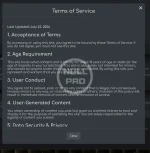
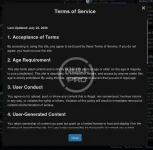
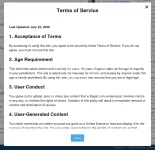
It works out of the box with zero configuration.
The modal reads the colors, fonts and button styling from your currently active style — and even the active style variation (light/dark) — so it blends right in on any theme. Nothing to configure and nothing to recolor when you switch styles. Prefer the plain look? A single option switches it to a standard light card.
The popup pulls straight from your live Terms and Privacy pages, so it's never out of date — edit the wording once and the modal reflects it immediately, with no caching to trip over.
XenForo scatters the bits that make up your Terms and Privacy pages, and files them where they're easy to miss. The add-on adds a Setup » Drac's Modal menu that puts the settings and every editor one click away — including shortcuts straight to the page wording and the page heading.
- Terms & Privacy in a popup — opens the built-in Terms and Rules and Privacy Policy pages in an elegant animated modal instead of navigating away.
- Great for registration — read both documents without leaving the sign-up form.
- Auto-theming — automatically matches your active style and style variation, on any forum, with no setup.
- Always in sync — shows your real, current page text; edit once and you're done.
- Admin shortcuts — jump straight to the wording and the heading of each page from a Setup menu section.
- Choice of animation — zoom, fade or slide.
- Site-wide or registration-only — you decide where the popup takes over.
- Light and fast — the popup library loads only the first time a member actually opens a modal, so normal page loads stay quick.
- Self-contained — no external CDNs and no third-party calls; everything is served from your own server.
- Graceful by design — Ctrl/Cmd-click and middle-click still open in a new tab, custom external Terms/Privacy URLs are left alone, and if anything ever can't load it simply falls back to the normal page.
- Opt-out per link — add a data-drac-modal-skip attribute to any link you want left as a normal navigation.
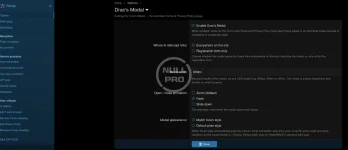
- Settings live at Setup » Options » Drac's Modal — enable/disable, where to intercept, modal width, animation and appearance.
- Convenience menu at Setup » Drac's Modal-- groups everything together:
- Options — the settings above
- Edit Terms & Rules — edit the Terms wording
- Rename Terms Heading — change the Terms page title
- Edit Privacy Policy — edit the Privacy wording
- Rename Privacy Heading — change the Privacy page title
- Enable / disable
- Where to intercept — everywhere on the site, or the registration form only
- Modal width — any CSS length (e.g. 800px, 60rem, 90%); always responsive
- Open / close animation — zoom, fade or slide
- Modal appearance — match forum style (default) or default plain style
Drac's Modal only ever styles its own popup — it never restyles your theme's templates or pages. That keeps it neutral and conflict-free on any style, including heavily customized ones.
- XenForo 2.2.x and 2.3.x
- Works with the standard Terms and Privacy help pages, including custom slugs such as privacy-policy and terms-and-rules
- No other add-ons required
- Download and unzip.
- Upload the contents of the upload folder to your forum root.
- Go to Admin CP » Add-ons and install Drac's Modal.
- Nothing to set up for theming — it follows whatever style each member is viewing.
- Using custom external Terms/Privacy URLs? Those open normally; the popup is for on-site help pages.
Enjoy — and if you spot anything, leave a message in the discussion thread.


![[OzzModz] Privacy Policy Popup](/data/resource_icons/14/14517.jpg?1720149311)
![[OzzModz] Terms And Rules Popup](/data/resource_icons/14/14518.jpg?1720149311)
![[XTR] Modal Popups](/data/resource_icons/7/7098.jpg?1720149273)