

- Compatibilidad con XF
- 2.3.x
- 2.2.x
- Descripción breve
- Add a permission setting to control who can view the "Staff online" widget.
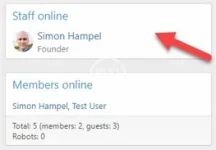
Add a permission setting to control who can view the "Staff online" widget.
Staff online is not a separate widget - it is part of the "members_online" widget.
You can turn off the display of Staff online globally via the widget settings, but that means nobody can see it - not even administrators.
You can turn off the display of the entire Members online widget (including Staff online) for specific users using the widget display condition field - but that shows or hides both parts of the widget.
On our sites, we want to discourage users from contacting staff directly for support and want them to use our helpdesk and report management system instead.
Using this permission setting, we can disable the display of Staff online for registered users while keeping it visible to administrators and moderators so the staff know which other staff are online. This also allows us to display the Members online part of the widget to all users, independently to who can view the Staff online component.
Widget configuration:
Make sure that Staff online block is enabled in the Members online widget:
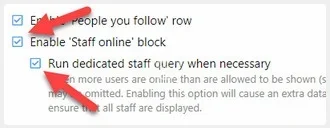
If you are restricting the Staff online component to only staff, the limited number of users will justify turning on the "Run dedicated staff query when necessary" option to ensure you get accurate data.
In this case, it is safe to leave it turned on, because it will be disabled automatically for any user who does not have permission to view the staff online list.
However, if you are allowing other larger user groups to also view Staff online, you might want to leave it turned off to save the extra query - but the Staff online list may not be accurate.
If you don't have the "Enable 'Staff online' block" option enabled, there's no point in using this addon, since nobody will see it anyway.
Permissions:
Assuming you are following the "only staff can view the staff online widget" model, then set the "View staff online" permission to "No" for guests and the Registered user group.
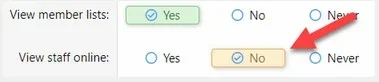
Then for any user groups you want to have access (eg Administrative and/or Moderating), set permission to Yes.
Note that this permission is linked to the View member lists permission - a user must have both to be able to view the Staff online list.


![[AndyB] Staff Online](/data/resource_icons/0/906.jpg?1720149240)


![[AndyB] View map](/data/resource_icons/4/4446.jpg?1743489056)