
![[Spolzer] Avatar History](/data/resource_icons/27/27751.jpg?1779079466)
- Compatibilidad con XF
- 2.3.x
- Descripción breve
- Automatically saves and stores your avatar history, allowing quick restoration. Smart deduplication ensures no duplicates, privacy settings control access, and automatic cleanup maintains efficiency.
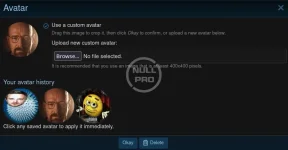
Automatically saves a user's avatar history every time they change or remove their avatar.
This allows users to quickly restore any previously used avatar without re-uploading the image.
The plugin stores a limited number of recent avatars and provides a convenient interface for viewing and restoring them.
✨ Features
💾 Automatic avatar saving
Every time an avatar is changed or removed, the previous version is automatically saved to history.
⚡ Quick restore
The user can select any saved avatar and set it again with a single click.
♻️ Smart deduplication
If the user sets an avatar that already exists in history, no duplicate is created.
🔒 Privacy settings
The user can control who is allowed to view their avatar history.
✍️ Use another user's avatar
If a user allows others to view their avatar history, other users can open it and choose any saved avatar.
The selected avatar can be applied to themselves with one click.
⚙️ Quantity limit
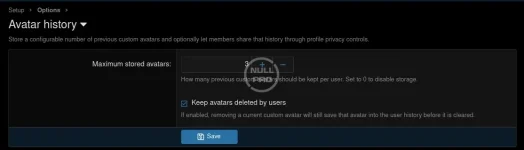
The administrator can set the maximum number of avatars stored for a single user.
🧹 Automatic cleanup
Old avatars are automatically deleted when the configured limit is exceeded.


This allows users to quickly restore any previously used avatar without re-uploading the image.
The plugin stores a limited number of recent avatars and provides a convenient interface for viewing and restoring them.
✨ Features
💾 Automatic avatar saving
Every time an avatar is changed or removed, the previous version is automatically saved to history.
⚡ Quick restore
The user can select any saved avatar and set it again with a single click.
♻️ Smart deduplication
If the user sets an avatar that already exists in history, no duplicate is created.
🔒 Privacy settings
The user can control who is allowed to view their avatar history.
✍️ Use another user's avatar
If a user allows others to view their avatar history, other users can open it and choose any saved avatar.
The selected avatar can be applied to themselves with one click.
⚙️ Quantity limit
The administrator can set the maximum number of avatars stored for a single user.
🧹 Automatic cleanup
Old avatars are automatically deleted when the configured limit is exceeded.


![[Spolzer] Watermark](/data/resource_icons/27/27753.jpg?1779079992)
![[Spolzer] Sticky Post](/data/resource_icons/27/27752.jpg?1779079709)
![[AndyB] Account upgrade purchase history](/data/resource_icons/2/2929.jpg?1720149251)
![[AndyB] Avatar manager](/data/resource_icons/24/24138.jpg?1742296706)
![[AndyB] Avatar notice](/data/resource_icons/26/26969.jpg?1767257010)