Magento 2 Imágenes WebP | Convertidor Automático de WebP por Magefan

Magento 2 Imágenes WebP | Convertidor Automático de WebP por Magefan 2.5.7 Nulled

No tiene permiso para descargar
Registrado
20 Ene. 2022
Mensajes
120
Puntuación de reacciones
71
Credits
$133
La extensión de Imágenes WebP para Magento 2 mejora el rendimiento de tu tienda en línea al convertir y servir automáticamente tus imágenes de productos en el formato moderno WebP. WebP ofrece un mayor compresion que los formatos tradicionales como JPEG y PNG, lo que resulta en tiempos de carga más rápidos de la página y una mejor experiencia del usuario sin comprometer la calidad de las imágenes.https://magefan.com/magento-2-webp-optimized-imagesCaracterísticas clave:
  • []*Conversión Automática de WebPConverte todos los imágenes de productos y categorías a formato WebP sin intervención manual.[]*Soporte Fallback:Sigue sirviendo imágenes originales en formato JPEG/PNG para navegadores que no soporten WebP, asegurando la compatibilidad total.[]*Mejorado el Tiempo de Carga del Sitio:Reduce la tamaño de las imágenes hasta un 30-50%, significativamente mejorando el tiempo de carga de tu sitio y las posiciones en los resultados de búsqueda.[]*Configuración Sencilla:Administrar los ajustes de extensión directamente desde el panel administrador de Magento con un interfaz amigable.[]*SEO Amigable:Loading imágenes más rápidas contribuyen a mejores puestos de ranking en motores de búsqueda y bajas tasas de abandono de página.[
  • Sin Impacto en Imágenes Originales:Las imágenes originales siguen sin ser tocadas, asegurando una optimización de imagen segura y reversible.[]*Soporta Multiples Tipos de Imágenes:Funciona con imágenes de productos, imágenes de categoría, páginas de CMS y bloques.
Beneficios:
  • [*Aumente la experiencia de compra de sus clientes con páginas que carguen más rápido.100% compatible con las versiones más recientes de Magento 2.
 
Archivos adjuntos
Última edición por un moderador:
Can you provide a cracked version?
 
Magefan Community Nulled - replace files and enter any key to save.
Magefan Community Nulled - 替换文件并输入任意键保存。
Yes, I replaced the Community moudle with Magefan Community 2.2.17 Nulled moudle,
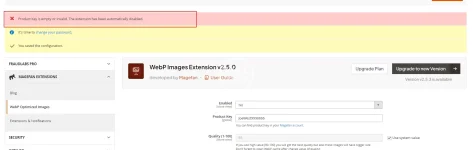
And I deleted the "generated" and "var" directories. After recompiling, the Webp still prompted that it needed to be activated, even though I entered any key in webp Configuration stage.1755479518135.webp
 
Yes, I replaced the Community moudle with Magefan Community 2.2.17 Nulled moudle,
And I deleted the "generated" and "var" directories. After recompiling, the Webp still prompted that it needed to be activated, even though I entered any key in webp Configuration stage.Ver adjunto 108121
Hold On ,i will check it.new version this package have more vaild .now please modify code from

PHP:
  final public function validate($data)
    {
        if (isset($data[$this->getModule()])) {
            return !empty($data[$this->getModule()]);
        }
        $k = $this->getKey();
      $result =true;
        return $result;
    }
to
Código:
  final public function validate($data)
    {
          return true;
    }
on file
module-community-2.2.17\Model\Section.php
to fix your issue .
 
Última edición:
Hold On ,i will check it.new version this package have more vaild .now please modify code from
稍等,我去检查一下。这个包的新版本有更多有效的功能。现在请修改代码。

PHP:
  final public function validate($data)
    {
        if (isset($data[$this->getModule()])) {
如果 (isset($data[$this->getModule()])) { 
            return !empty($data[$this->getModule()]);
        }
        $k = $this->getKey();
      $result =true;   $result = true;
        return $result;
    }
to
Código:
  final public function validate($data)
    {
          return true;
    }
on file 在文件中

to fix your issue .
解决你的问题。
Thanks for you tell,

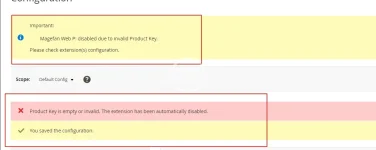
I completed the above modifications and recompiled the code. However, when I accessed the backend page, I found that there was still the error message "Magefan Web P: disabled due to invalid Product Key. Please check the configuration of the extension(s)." Even after I cleared the files and cache and recompiled again, it didn't work.


Besides,
I attempted to remove: </field> <field id="key" translate="label" type="text" sortOrder="30" showInDefault="1" showInWebsite="0" showInStore="0">
<label>Product Key</label>
<frontend_model>Magefan\Community\Block\Adminhtml\System\Config\Form\ProductKeyField</frontend_model>
</field>

On files /Magefan/WebP/etc/adminhtml/system.xml

But,it still didn't work.


1755500547171.webp
 
Thanks for you tell,

I completed the above modifications and recompiled the code. However, when I accessed the backend page, I found that there was still the error message "Magefan Web P: disabled due to invalid Product Key. Please check the configuration of the extension(s)." Even after I cleared the files and cache and recompiled again, it didn't work.


Besides,
I attempted to remove: </field> <field id="key" translate="label" type="text" sortOrder="30" showInDefault="1" showInWebsite="0" showInStore="0">
<label>Product Key</label>
<frontend_model>Magefan\Community\Block\Adminhtml\System\Config\Form\ProductKeyField</frontend_model>
</field>

On files /Magefan/WebP/etc/adminhtml/system.xml

But,it still didn't work.


Ver adjunto 108136
No .what is magento version?clear var folder and then try it .i can not tested faild
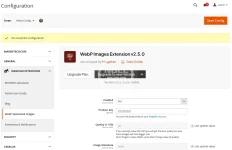
2025-08-18_154124.webp
 
Última edición:
Yes, I did clear the var and generated folder, but it still didn't work. My Magento 2 version is 2.4.7-p7.
 
Yes, I did clear the var and generated folder, but it still didn't work. My Magento 2 version is 2.4.7-p7.
Tested version number was 2.4.8 ,no find any issue .if do not modify any code it is work too with new .
Código:
  final public function validate($data)
    {
        if (isset($data[$this->getModule()])) {
            return !empty($data[$this->getModule()]);
        }
        $k = $this->getKey();
      $result =true;
        return $result;
    }
this code only was touch issue when upgrading was happen,make sure your files floder permission .and remove var folder,run setup:up and then tested-
 
Tested version number was 2.4.8 ,no find any issue .if do not modify any code it is work too with new .
Código:
  final public function validate($data)
    {
        if (isset($data[$this->getModule()])) {
            return !empty($data[$this->getModule()]);
        }
        $k = $this->getKey();
      $result =true;
        return $result;
    }
this code only was touch issue when upgrading was happen,make sure your files floder permission .and remove var folder,run setup:up and then tested-
Sometimes it is necessary to restart PHP to update OPCache data. Even if you need to restart Apache or nginx. If your disk has M2 cache, sometimes you also need to restart the server,linux will cache file when lots of files was update or delete .you can find delete ALL twice ,it was really deleted
 
Superior